I have discovered a very good posting in a mathworks blog.
Here you'll find information about the question "How do I process a set of image files in a directory?"
Have a while
Friday, August 1, 2008
batch proces picture files in matlab

Wednesday, July 30, 2008
advanced way to export figures using hgexport with matlab
i will explain how to export figures to a file using hgexport with matlab.
here is how:
first you need to create the figure:
h.figure = figure
clf
position = get(gcf,'Position');
set(h.figure,'Color','w',...
'PaperPositionMode', 'auto', ...
'Units','in','Position',[position(1:2) 6 2.5 ],...
'PaperPosition',[0.25 0.25 6 2.5])
then, plot the figure. use all the commands you like, like plot, stairs and subplot...
at the end, export the figure using hgexport:
myStyle = hgexport('factorystyle');
myStyle.Format = 'png';
myStyle.Width = 6;
myStyle.Height = 2.5;
myStyle.Resolution = 300;
myStyle.Units = 'inch';
myStyle.FixedFontSize = 12;
hgexport(h.figure,'fileout.png',myStyle,'Format','png')
with Width and Height you can control the size of the file in inch (units).
Tuesday, July 22, 2008
about renderers and exporting figures
Today i was having trouble exporting a figure using the opengl renderer (default for surfaces). To see which renderer a figure is using, use this command:
get(gcf,'Renderer')
The solution was to change the renderer to z-buffer. To do so, just use this command:
set(gcf,'Renderer','zbuffer')
This was necessary to export my carpetplots using the command:
myStyle = hgexport('factorystyle');
myStyle.Format = 'png';
myStyle.Width = 6;
myStyle.Height = 4;
myStyle.Resolution = 300;
myStyle.Units = 'inch';
myStyle.FixedFontSize = 12;
hgexport(h.fig,'filename.png',myStyle,'Format','png')
See my other posts to know more about the carpetplot function.
Monday, July 21, 2008
Libraries in Simulink -
It is very important to use libraries in simulink if you have peaces of code (or subsystems) that repeats over a modell or even more. Take a look at this posting from Seth, and learn how to create and use libraries in simulink.
Thursday, July 17, 2008
Saving figures from the command line in Matlab
In the documentation of the function saveas you can read, that there is an alternative using the gui: file -> save as....
for me, this 2 methods did a different grafic, because of the different resolution used to export the figure.
There is an article in the mathworks technical solutions that handles this, but i was unable to create a grafic and save a file that looks exaclty as the plotted figure.
Friday, July 11, 2008
Save Time writing M-Functions in Matlab
If you usually write m-Functions, you can consider using Templates to save time. In this blog you can find a small tutorial on how to use templates.
The time you need to write a new function, you just open a "new function M-File" (see picture above).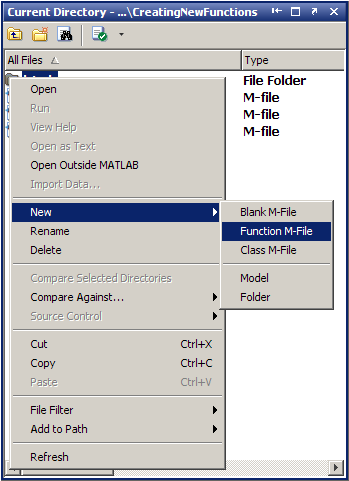
Subscribe to:
Posts (Atom)